AutoCAD .NET
-

That has to be one of my favourite post titles, to-date: it'll be interesting to see how Twitterfeed handles it. 🙂 In this post we're going to combine the approaches from a couple of previous posts to place source code to generate associative, lofted surfaces on the clipboard, ready for pasting into a C# project. When we did this before for polylines, we didn't really care about grouping them: we could just select all of the polylines in a drawing and they would (hopefully) be reproduced when the generated code was executed in the target drawing. This is a bit…
-
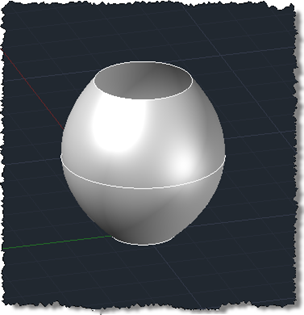
As mentioned a few posts ago, I'm working towards generating a set of surfaces from some polyline profiles, to programmatically create a space shuttle. Most of the surfaces are "lofted", so that seems a good place to start. Today we're going to implement a simple command that creates a lofted surface from three circular profiles. This is based on functionality added in AutoCAD 2011, so apologies to those using prior versions. If anyone's interested in where the term "lofted" comes from, the ever-useful Wikipedia has some information for us: The term lofting originally came from the shipbuilding industry where loftsmen…
-
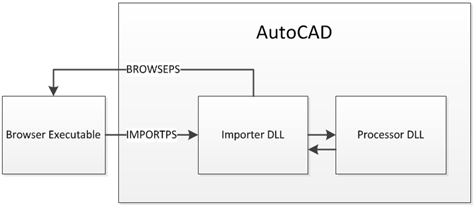
This handout is for the companion class to the one whose handout formed my last post. While that class was user-focused, this one, "CP322-2 - Integrate F# into Your C# or VB.NET Application for an 8x Performance Boost", is more developer-focused and takes the hood off the implementation of the BrowsePhotosynth application. The code for this special version of the application – which imports synchronously via C# and synchronously/asynchronously via F# – is available here for download. Introduction This class takes a look at the implementation of BrowsePhotosynth for AutoCAD, the ADN Plugin of the Month from October 2010 and…
-

A colleague set me a fun little geometry-related challenge a couple of days ago: to write C# and F# applications to make AutoCAD draw lines between a number of points spaced evenly around the circumference of a circle. Here's the first C# version I wrote, which makes use of a function to collect the various points before indexing into the collection from a nested loop: using Autodesk.AutoCAD.ApplicationServices; using Autodesk.AutoCAD.Runtime; using Autodesk.AutoCAD.DatabaseServices; using Autodesk.AutoCAD.Geometry; using System; namespace CircleOfLines { public class Commands { public static Point3dCollection pointsOnCircle( Point3d center, double radius, int n ) …
-

Here's an idea I've been playing around with for some time: say you want to capture geometry as code for pasting back into your application, how do you do it? For instance, sometimes you might want to model geometry using AutoCAD and then capture it as code for later generation at runtime. I have a specific example in mind, of course: I have some boundary loops that can be used to generate the outer shell of a space shuttle using the surfacing capabilities introduced in AutoCAD 2010. I'd really like to use code to store these loops and – in…
-
I spent more time than I wanted tunneling down a rabbit-hole, today. Thankfully I really didn't have a great deal of time to focus on the problem at hand, otherwise I might have spent even more time down there. But perhaps the time wasn't all wasted – at least I've made a blog post out of it, even if it's mainly to vent my frustration. 🙂 I started – on a positive note – by fixing the focus issues when certain uses of the Clipboard Manager result in AutoCAD not having focus (presumably the palette has it, instead): P/Invoking the…
-
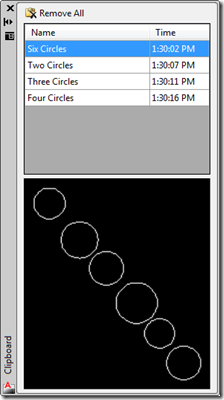
I've made a couple of updates to the Clipboard Manager in this latest version. Firstly I wanted to remove a peculiar situation that occurred in the previous versions when you copy something to the clipboard that isn't AutoCAD geometry: for some reason this act invalidates the ability to access data – such as the preview images – from the items in the Clipboard Manager. The pasting into the drawing still works, as setting an AutoCAD object back onto the clipboard re-enables access to AutoCAD data. You can try this with the previous version by creating a number of entries on…
-
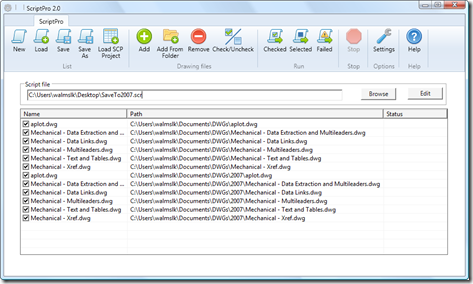
As mentioned previously, Viru Aithal, from DevTech India, has been working hard on a replacement for the venerable ScriptPro tool. I'm delighted to say that it's now ready, and is live on Autodesk Labs as November's Plugin of the Month. Viru took the codebase he developed for the DWF/PDF Batch Publish tool and created ScriptPro 2.0, written from the ground up in C# and developed without any dependency on a specific AutoCAD version. Viru's approach uses the equivalent of late binding to call into AutoCAD through COM and so doesn't require a specific AutoCAD Type Library. Which means the tool…
-
I mentioned in the last post that I was looking to optimise my approach for automatic cropping of an image. It turns out that using Bitmap.LockBits() and the corresponding UnlockBits() does indeed help, although I haven't run any actual benchmarks to measure the difference in the two approaches. The disadvantage of this approach is that you're a bit more down "in the weeds" when it comes to accessing the raw data – you have to support different raw image formats, for instance (and it may well be that I've missed some important ones – it's only really by chance that…
-
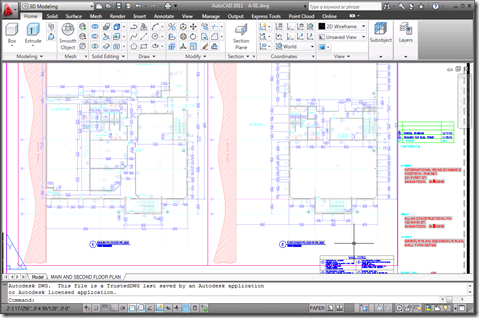
I received a few comments by email and otherwise regarding the preview capability added to the Clipboard Manager Plugin of the Month in the last post. Basically it's useful, but only to a point: the bitmap created on the clipboard is the same size as AutoCAD's screen, with the copied objects in their location relative to the screen. This means that if you're working on a drawing like this: And you want to copy the leader to the left of the cursor to the clipboard, the preview you'll end up with will be something like this: Which – when scaled…