AutoCAD .NET
-
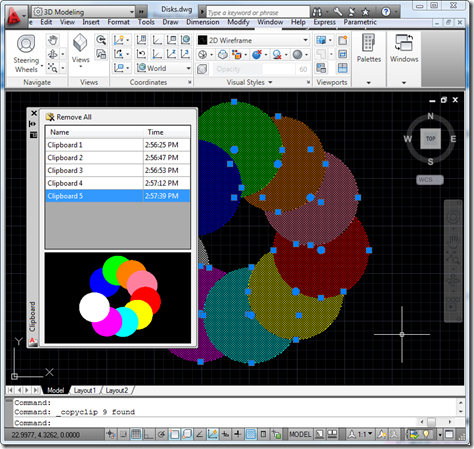
As mentioned yesterday, I went ahead and integrated previewing into the Clipboard Manager Plugin of the Month. I won't include the code directly in the post – it's fundamentally similar in nature to that posted yesterday and is, in any case, included in the project. There were a few additional tricks needed, such as modifying the SplitterDistance property of a SplitContainer to make sure the aspect ratio of the image gets maintained, but nothing particularly earth-shattering. Here's the updated project – I'll be looking into the "save between session" feature (which I suspect is going to morph into a "save…
-

I've been meaning to attack this one since we first published the Clipboard Manager as a Plugin of the Month: working out how to display a preview image of the clipboard contents inside the Clipboard Manager palette. And then I happened to receive a request by email, yesterday, suggesting a couple of enhancements to the tool. A nice reminder. 🙂 1. Have the clipboard include image previews, similar to that of the wblock command (instead of needing to immediately rename the item when fast copying multiple items). 2. Have the clipboard store items in memory for use in between autocad…
-
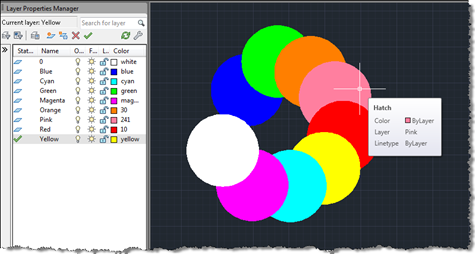
Terry Dotson has – once again – generously offered an application to be an ADN Plugin of the Month. This little tool, called DrawOrderByLayer, allows you to modify the draw-order of objects in an AutoCAD drawing according to the layer they're on. I don't expect this to go live for another month or so (I still have plans for November's plugin), but I did want to post it in order to give people the chance to provide feedback. Here's basically how it works… You have layers containing geometry – in this case I've created circular solid hatches on layers named…
-
I had a very nice surprise in my inbox, this morning. Thorsten Meinecke, from GTB in Berlin, decided to convert the VB.NET code contained in the last post into an F# script and to share it with this blog's readership. Thanks, Thorsten! 🙂 One thing about it being an F# script (typically stored in a .fsx file) is that it can be loaded and executed directly from the "F# Interactive" (FSI) component in Visual Studio without the need to build it into a project creating an executable. What's also very nice is that the XAML defining the WPF dialog is…
-
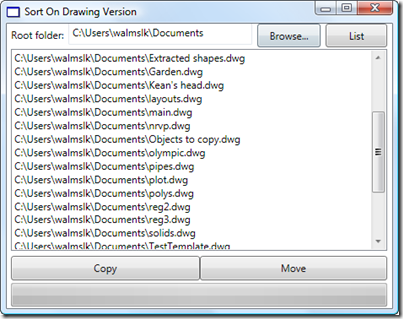
A friend in our Product Support team in Neuchâtel asked me to help develop a little application to sort drawing files on disk. He has some old Clipper scripts that he used during a previous life as a CAD Manager to sort drawing files into different folders based on their version (held in the first six bytes of the DWG file, as mentioned in this previous post and this post of Shaan's). We decided I'd implement it in VB.NET, to make it easier for him to understand and extend. The application is simple enough, but could make a mess of…
-
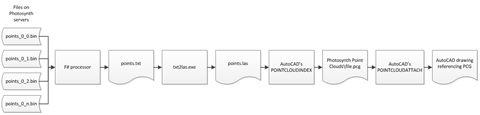
I just thought I'd report back on a few changes made to the BrowsePhotosynth Plugin of the Month during the course of this week. The updated version has just been announced on Scott Sheppard's blog and I thought I'd share some of the specific implementation details. The first one (in the 1.0.1 update) was a really interesting problem and I owe a big thanks both to Alberto Venturini for reporting it and to Marat Mirgaleev, from our DevTech team in Moscow, for helping test on a comparable OS. The problem was that on all the systems upon which Alberto had…
-

Many of you will have seen previous incarnations of this tool, during its development. It's a little more complex than most of our other monthly plugins – mostly as it depends on a couple of external components – but the functionality should hopefully be simple enough to understand and use. I won't go into great details here, but if you're using AutoCAD 2011, give it a try by downloading the ZIP from the Autodesk Labs Plugin of the Month site and executing the contained installer package. From there you should be able to run the BROWSEPS command inside AutoCAD to…
-

Thanks to Philippe Leefsma, from our DevTech team in Europe, for providing the code for this post. Philippe kindly based his code on that provided in this previous post, which made it especially easy for me to format for posting. Thanks, Philippe! 🙂 In the post linked to above we saw some code defining a SAP (SweepAlongPath) command. This post extends that to implement a complementary RAA (RevolveAroundAxis) command. Philippe's original code asked the user for a line to define the axis of revolution. I generalised the code slightly to accept a curve: as we're only using the vector between…
-
As mentioned in the last post, I decided to update the RegDL tool – which can be used to create demand-loading entries for an AutoCAD .NET module from, for instance, an installer – to support optional logging to a file. If you now run RegDL.exe with the /log command-line switch, then the application will now create a text file, reglog.txt, in the executable's folder with the high-level results of the registration (with hopefully some useful detail in case of failure). Here are the main, updated files, Program.cs: using System.Reflection; using System.IO; using System; using DemandLoading; namespace RegDL { …
-
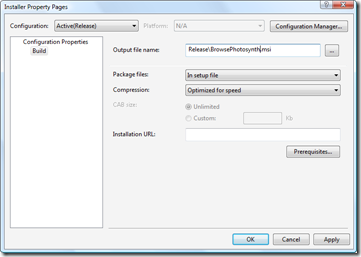
In the first part in this series, we looked at getting our basic installer to install files and in the second part we focused on checking and modifying the Registry. In this part we're going to finish up our installer by tweaking the user interface. Let's get started with some fundamentals: the name of the MSI file itself. This can be modified via the Installer project's property page (which I pulled up by right-clicking the project in the Solution Explorer and selecting "Properties"): A pretty simple one, but one that's worth making, nonetheless. Let's go ahead and spruce up our…