AutoCAD .NET
-

Now things are getting interesting. 🙂 It took me some effort to get this working, but looking at the results I think it was worth it. As mentioned in the last post, I've been trying to get a live feed from the Kinect sensor to display dynamically inside AutoCAD. This post shows how to do that. A huge thanks to Boris Scheiman for helping me get to this point: he not only extended his nKinect implementation to generate the point cloud data I asked for, he sent a number of emails explaining (and even providing) the various modules needed to…
-
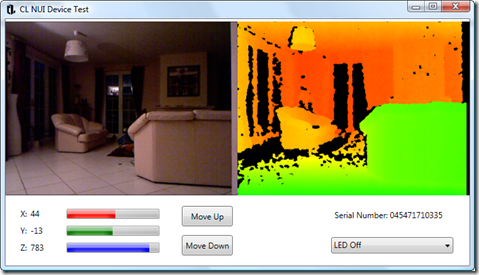
After a completely ridiculous wait of close to 4 months, I finally received my Kinect a few weeks ago. Apart from it being the fastest selling consumer electronics device in history, the delay was also due to the fact I was holding out for the very popular Xbox 360 250Gb Slim bundle (and also because the vendor I chose fumbled the order during the final few weeks, which just added insult to injury). I'd done my homework before receiving the Xbox, and realised that the bundled Kinect would not come with the external power supply needed to connect it to…
-
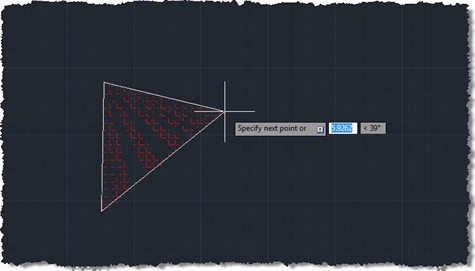
This question came in a few weeks ago, which I thought worth addressing: Hi, Kean! I have a question - how can we create hatch during jig? The code in this post endeavours to do just that, but – be warned – isn't fully successful. The problem I chose to interpret this as is "how do you jig the creation of a polyline, using it as the boundary for an associative hatch?", and it's not an easy one to solve. I started by taking Philippe Leefsma's code from this previous post, which jigs a polyline (including arc segments). I switched…
-
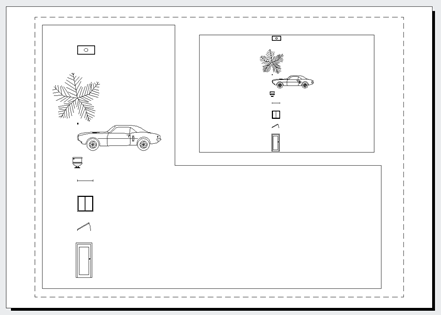
We've been looking a lot at transient graphics, recently. The standard approach we've been using to displaying graphics in all viewports has been to pass in an empty IntegerCollection into the various transient graphics-related methods, rather than listing the viewports specifically in which we want to display the graphics. Thorsten Meinecke made the very valid point that this doesn't always work as you'd like, particularly when you have multiple floating paperspace viewport. Now I fully admit I'm not a big user of viewports, as far as it goes, so I sometimes forget to cater for scenarios that are probably extremely…
-
Since starting to use the transient graphics API in AutoCAD 2009, I've believed that any DBPoints you display would not respect PDMODE (the AutoCAD system variable allowing the user to control how points are displayed). A recent internal discussion was on this very subject, and one of our engineering team, Longchao Jiang, interjected with a comment explaining that only points on the DEFPOINTS layer get displayed without PDMODE being applied. This was quite a revelation for me: DBPoints apparently get created on DEFPOINTS by default and simply changing them to layer 0 (say) would cause them to respect PDMODE when…
-
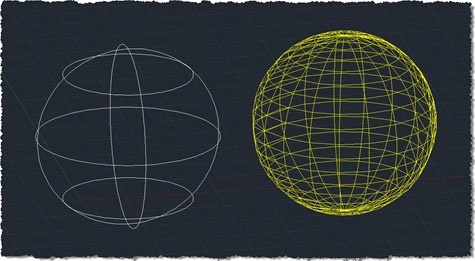
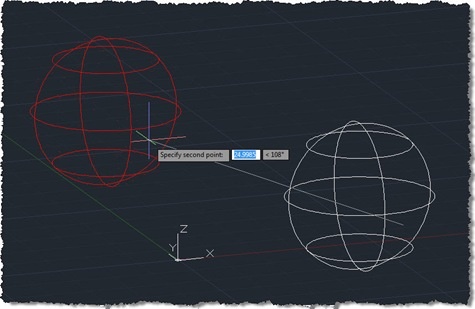
Thanks for Balaji Ramamoorthy – who recently joined our team in India – and Adam Nagy for helping generate the code for this post. There are lots of reasons people might want to tessellate a 3D solid in AutoCAD to generate a mesh. The code in today's post uses the Boundary Representation (Brep) API in AutoCAD to do just that, generating a set of 3D faces. A few points about the implementation: I've only made a small number of settings to control the mesh generation: more are available for you to experiment with. It should be simple enough to generate…
-

As you may have seen – including over at Shaan's blog – the 2012 family of our products has now been announced. Stephen Preston, our DevTech Americas Manager, has recorded a DevTV session on the new APIs in AutoCAD 2012. This material was presented during our recent Developer Days tour, attended by ADN members around the world. AutoCAD 2012 – New APIs View Download (17.2MB) Samples (133KB) Highlights & topics covered: Migration steps New APIs Associative Array API Multi-mode Grip API ResetTimes VisibilityOverrule BlockTableRecord.SetIsFromOverlayReference acdbConvertAcDbCurveToGelibCurve acdbConvertGelibCurveToAcDbCurve acdbAssignGelibCurveToAcDbCurve Autoloader Simplified plugin deployment AutoCAD for Mac I'll definitely be following up with…
-
As promised, I ended up burning more that a few hours this evening (after being up very early for meetings this morning), to add orthographic drawing support to the code shown in the last post. It took quite some work, switching between UCS and WCS until my head was more than a little twisted. This thread on The Swamp provided well-needed inspiration, too (thanks, MickD :-). Here's the C# code – I would have highlighted the modified lines in red, but the code is too wide to add 3-digit lines without it looking ugly, and – besides – I need…
-
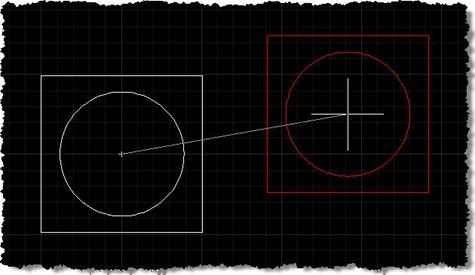
A big thanks to Norman Yuan for the technique shown in this post. I stumbled across Norman's post on this topic, and decided to take his code and rework it for posting here, with Norman's permission, of course. Very interesting stuff! 🙂 First things first: you probably don't have a burning need to reinvent either the wheel or AutoCAD's MOVE command. That said, this is a technique that may be of interest to many of you, especially if – for whatever reason – you're looking for an alternative to using a jig. The technique Norman has shown uses a combination…
-
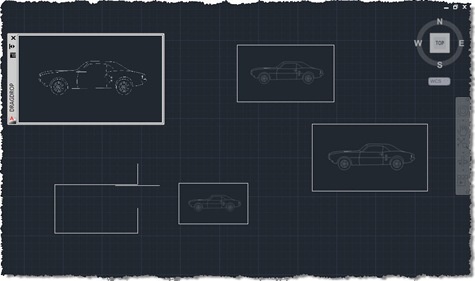
I'm in Las Vegas, running between meetings, presentations and performance reviews, so just a quick post, today (it's just before midnight here, but already Monday morning in Europe). I promised in the last post and the one before that I'd extend the code we've been looking at to enable drag & drop of raster images into AutoCAD with resizing of the dropped image via a jig, using the code in this previous post as a foundation. The below C# code does just that, with the new/modified lines in red (and the complete, unnumbered source file here): 1 using Autodesk.AutoCAD.ApplicationServices; …