Geometry
-
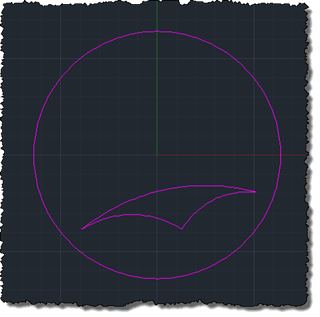
As mentioned in the last post, today's post looks at how to draw hyperbolic geometry using the Poincaré disk model inside AutoCAD. This is an interesting exercise, but probably won't ultimately help us with the hyperbolic tessellations we're aiming to create: it's interesting as it will end up with us having a mechanism for mapping hyperbolic geometry onto an arbitrary circle inside AutoCAD, but as we're probably going to end up creating straight-lined segments for the polygons we use to create our pattern, it's mostly an exercise (and will probably be largely irrelevant to our end result). The tough part…
-
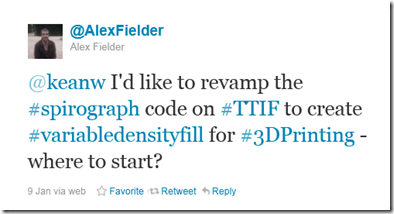
A regular follower of this blog and someone I now consider a friend through our online interactions, Alex Fielder, recently laid down the gauntlet for the topic of the coming series of posts. He started with Twitter… … and then moved on to The Swamp (which he thankfully also brought to my attention using Twitter). Alex has become interested in an area that I can see becoming increasingly relevant: given the fact that 3D printing is an additive, rather than subtractive or mold-based, process, shouldn't we take advantage of this fact to optimise the composition of an object's internal structure?…
-
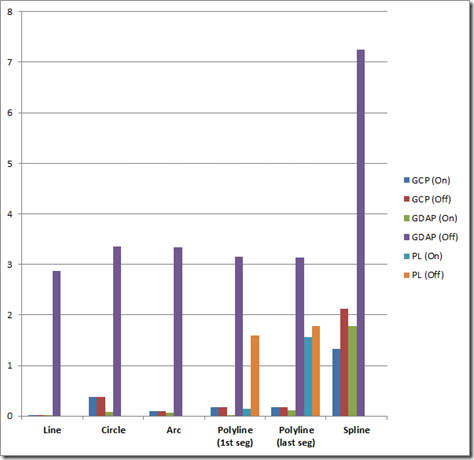
A couple of recent posts have covered different ways of checking whether a point is on a curve. This post looks at a rudimentary way of profiling the relative performance of these various methods, in order to determine the best approach to use, in general. There are various performance profiling technologies available on the market, but given the specificity of the cases we wanted to test and compare, I rolled my own very simple approach. Nothing at all earth-shattering, just a helper function that will call one of our methods (passed in as a delegate with a specific signature) a…
-
One great thing about having an engaged blog readership is that people catch issues quickly (which helps keep me honest :-). When I posted late on a Friday night (under self-imposed pressure to get a third post up in a four-day first week back after the holidays), I suspected I'd missed something. I even checked the protocol I expected to contain the function I knew had to be there, but obviously not thoroughly enough. Anyway, all this to say that there's a better, more general approach to finding whether a point is on a polyline, the subject of the last…
-
Occasionally I come across a topic that I'm sure I've addressed in a previous post, but for the life of me I can't track it down. The code in a recent response by Balaji Ramamoorthy, from the DevTech India team, fits firmly into this category: it shows how to iterate through a polyline's segments, testing whether a point is on the polyline. I did some refactoring of Balaji's code to extract it into a helper function (although not an extension method, which people who use them may prefer), but otherwise this C# code is basically his. using Autodesk.AutoCAD.ApplicationServices; using Autodesk.AutoCAD.DatabaseServices;…
-
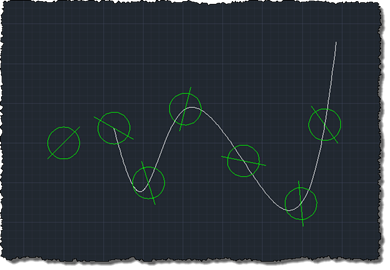
I'm not sure why it's taken me so long to get around to posting this code. It was originally developed by Philippe Leefsma for last year's Developer Days, to demonstrate a very interesting API added to AutoCAD 2012. Looking back, it appears it was covered in this DevTV session, posted when AutoCAD 2012 was announced, so the information has been there for some of you to find, at least. Anyway, as many of you will know, associative arrays are an extremely powerful feature within AutoCAD that allow you to create impressive results. You can create rectangular, polar and path-based arrays,…
-
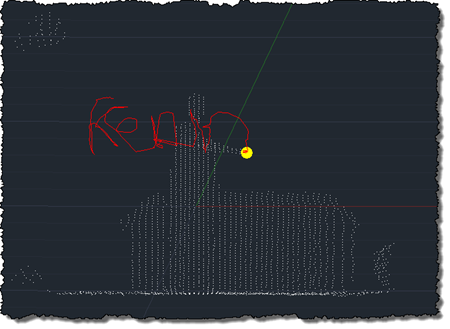
After using the Microsoft Kinect SDK to bring point clouds into AutoCAD and then to track skeleton information, I'm happy to report that I now have an equivalent implementation of this previous post, where we used OpenNI and NITE to understand gestures captured by the Kinect and draw 3D polylines inside AutoCAD. This implementation is a bit different from the last, mainly in that – given the additional calculation needed to map points into "skeleton space" when building out point cloud – I no longer transform all the points and then select a sampling. This implementation passes a sampling value…
-
Stephen Preston sent me an update to his minesweeper application, some time ago, and it's been languishing in my inbox until today. Stephen has spent some time polishing the app, adding a more coherent architecture (or so he tells me). As I'm busy beavering away with the Kinect SDK, I thought I'd go ahead and post the code. Here is the updated, AutoCAD-specific command class: Imports Autodesk.AutoCAD.Runtime Imports Autodesk.AutoCAD.ApplicationServices Imports Autodesk.AutoCAD.DatabaseServices Imports Autodesk.AutoCAD.Geometry Imports Autodesk.AutoCAD.EditorInput Imports System Imports System.Collections.Generic ' This line is not mandatory, but improves loading performance <Assembly: CommandClass(GetType(Minesweeper.MyCommands))> Namespace Minesweeper Public Class…
-
In the 2010 release, we introduced 2D geometric constraints to AutoCAD. The feature was implemented using AutoCAD's low-level – and very powerful – Associative Framework, which has subsequently been used to implement features such as parametric surfaces in AutoCAD 2011 (more information on that here). Our initial API implementation for creating and accessing geometric constraints (which you can find out more about via the DevTV session linked to from this previous post) in many ways reflects the low-level nature of the underlying framework: it was unfortunately just a bit too complicated for most mortals to get to grips with. Philippe…
-
I suspect that many of you who have worked with point clouds will have come across this issue: the standard CIRCLE command in AutoCAD will create the circle on the plane of the active User Coordinate System (UCS), even when the circle is defined by three points on its circumference. This behaviour is probably fine for the majority of 2D drafting activities, but if you want to create circles from a point cloud – by selecting points from its perimeter using the Node object snap – then it's less than ideal. The code in today's post implements a very simple…