Kinect
-
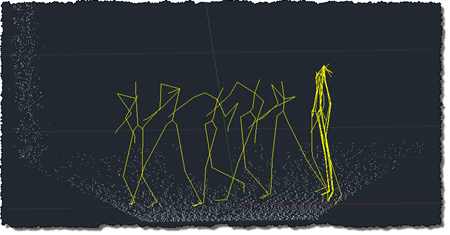
To follow on from my post showing how to get point cloud information from Kinect into AutoCAD – using Microsoft's official SDK – this post looks at getting skeleton information inside AutoCAD. The code in today's post extends the last – although I won't go ahead and denote the specific lines that have changed – by registering an additional callback called by the Microsoft runtime which, in turn, stores data in memory to be displayed when the jig's WorldDraw() is next called inside AutoCAD. The main thing to note is what's needed to map the skeleton information into AutoCAD's world…
-
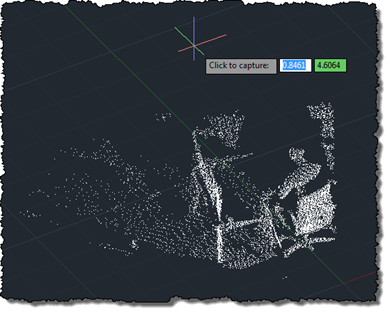
As mentioned, last week, I've been working away to port my previous OpenNI/NITE AutoCAD-Kinect integration across to the official (although still in Beta) Microsoft Kinect SDK. Today's post presents a very basic implementation – essentially equivalent to the code in this previous post – which makes use of the Microsoft Kinect SDK to bring a colourised point cloud into AutoCAD. As in the previous post, the txt2las tool is still currently needed to bring the generated point cloud into AutoCAD. It's worth noting that the Microsoft SDK is a) much simpler to install/deploy and b) provides more reliable colourisation of…
-

Given the fact AU 2011 is quickly approaching, I decided it was time to dust off my Kinect-related code and getting it working with the Beta SDK from Microsoft Research. Part of the reason I haven't been able to do this sooner is that my primary work machine is currently a MacBook Pro running Windows 7 via Parallels, and the Microsoft Kinect driver currently does not support working inside a Virtual Machine. I did start to try to get my previous implementation using OpenNI + NITE to work on this system, but as it uses the nKinect component that is…
-
The class catalog for Autodesk University 2011 is now available to preview in advance of the conference registration opening up on August 30th. Here are the sessions I'm either presenting or hosting: CP3840 Integrating Microsoft® Kinect™ with AutoCAD® Lecture Nov 30, 3:15pm CP4459-U AutoCAD® .NET Development: Tools and Best Practices Unconf-erence Dec 1, 1:15pm I'm also honoured to be co-presenting the following session with the famous (and famously lowercase) dave espinosa-aguilar: CP4717 Unlimited AutoCAD® Scripting for Everyone Lecture Nov 29, 5:00pm And I'm part of the panel for the following sessions: CP2149 AutoCAD® APIs: Meet the Experts Stephen Preston Panel…
-
After focusing on a manual process for sweeping a solid inside AutoCAD in this previous post, it seemed to make sense to attempt to automate more of that process. In the code in this post, we take a standard circular profile – of a user-specified radius – and sweep it along the path defined by the user's hand movements. Back in the original Kinect integration example we created a 3D polyline path linking every position of the user's hand detected by Kinect. This makes a very jittery path for our purposes, so we're going to define a spline along fit…
-
In this previous post we looked at some code to capture and combine a series of point clouds using a Kinect sensor. In today's post we're going to take a very slightly modified version of the code – which really only adds the feature to let the user choose when the sequence of captures should start by clicking, rather than it just starting at the beginning of the command – to capture the geometry created by dragging a 2D cross-section in 3D space. The code in the last post clearly played a big part in helping digitise the profile and…
-
Over the weekend, I had more fun exploring the use of Kinect with AutoCAD. It was prompted by an email I had from a UK-based creative team who are interested in the potential of capturing time-lapse point clouds using Kinect. They were curious whether the quality of data coming from the Kinect device would be adequate for doing some interesting trompe l'oeil video compositions. I started by taking the code from last week's Kinect post: I removed the code related to gesture detection and beefed up the point-cloud related implementation to deal with composite point clouds that are built up…
-
I've improved the basic implementation in this previous post pretty significantly over the last week: New ability to draw multiple polylines Added a gesture of lowering/raising the left hand to start/finish drawing with the right Addition of a transient sphere as a 3D cursor for polyline drawing Quick flash of a transient skeleton (arms and chest only) on user detection The jig now perpetuates by changing the screen cursor minutely to and fro Mouse input is needed to keep the jig active; Kinect input doesn't yet count 🙂 A new gesture of placing hands together to end drawing At Barry…
-
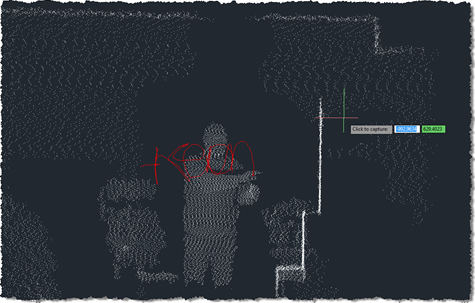
As promised in this previous post, I've been playing around with understanding Kinect gestures inside AutoCAD. My first step – after upgrading the OpenNI modules and drivers to more recent versions, which always seems time-consuming, for some reason – was to work out how to get gesture information via nKinect. It turned out to be very straightforward – as it's based on OpenNI and NITE, the user-tracking and gesture detection come pretty much for free. A few things I had to work out: We needed a "skeleton callback", which is called when body movements are detected Because this is fired…
-

I'm a bit late announcing this, but as I'm due to submit my own proposals for Autodesk University 2011 by the May 6th deadline, I thought I'd post a quick note to remind readers of the fast-closing window of opportunity to submit your own proposals to speak at this year's AU. I'm definitely submitting a session showing how to integrate AutoCAD with Kinect (please don't go stealing my idea, now ;-), and I'm chewing on another topic, which may prove to be "choosing the right programming language for working with AutoCAD". I'm still open to delivering additional sessions, in case…