Point clouds
-
Over the weekend, I had more fun exploring the use of Kinect with AutoCAD. It was prompted by an email I had from a UK-based creative team who are interested in the potential of capturing time-lapse point clouds using Kinect. They were curious whether the quality of data coming from the Kinect device would be adequate for doing some interesting trompe l'oeil video compositions. I started by taking the code from last week's Kinect post: I removed the code related to gesture detection and beefed up the point-cloud related implementation to deal with composite point clouds that are built up…
-
I've improved the basic implementation in this previous post pretty significantly over the last week: New ability to draw multiple polylines Added a gesture of lowering/raising the left hand to start/finish drawing with the right Addition of a transient sphere as a 3D cursor for polyline drawing Quick flash of a transient skeleton (arms and chest only) on user detection The jig now perpetuates by changing the screen cursor minutely to and fro Mouse input is needed to keep the jig active; Kinect input doesn't yet count 🙂 A new gesture of placing hands together to end drawing At Barry…
-
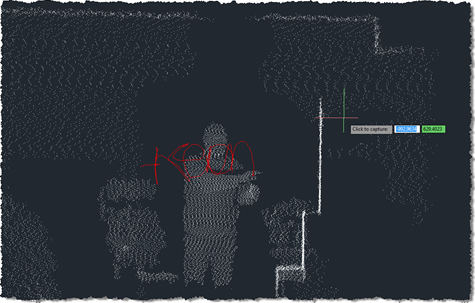
As promised in this previous post, I've been playing around with understanding Kinect gestures inside AutoCAD. My first step – after upgrading the OpenNI modules and drivers to more recent versions, which always seems time-consuming, for some reason – was to work out how to get gesture information via nKinect. It turned out to be very straightforward – as it's based on OpenNI and NITE, the user-tracking and gesture detection come pretty much for free. A few things I had to work out: We needed a "skeleton callback", which is called when body movements are detected Because this is fired…
-
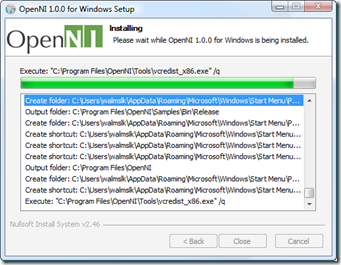
Now things are getting interesting. 🙂 It took me some effort to get this working, but looking at the results I think it was worth it. As mentioned in the last post, I've been trying to get a live feed from the Kinect sensor to display dynamically inside AutoCAD. This post shows how to do that. A huge thanks to Boris Scheiman for helping me get to this point: he not only extended his nKinect implementation to generate the point cloud data I asked for, he sent a number of emails explaining (and even providing) the various modules needed to…
-
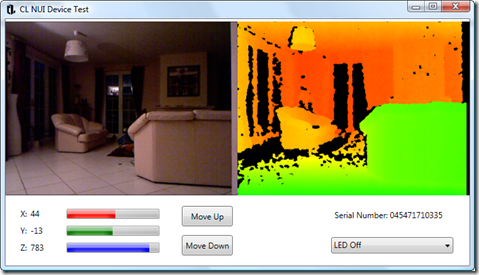
After a completely ridiculous wait of close to 4 months, I finally received my Kinect a few weeks ago. Apart from it being the fastest selling consumer electronics device in history, the delay was also due to the fact I was holding out for the very popular Xbox 360 250Gb Slim bundle (and also because the vendor I chose fumbled the order during the final few weeks, which just added insult to injury). I'd done my homework before receiving the Xbox, and realised that the bundled Kinect would not come with the external power supply needed to connect it to…
-
As many of you may now be aware, much of the content recorded at this year's Autodesk University is now available on the AU website. You'll find the recording of my AU Virtual session, "Getting to Know the AutoCAD® Plug-ins of the Month", as well as material from the two physical sessions I presented, "Point Clouds on a Shoestring" and "Integrate F# into Your C# or VB.NET Application for an 8x Performance Boost". In fact, much to my surprise, the "Point Clouds on a Shoestring" session (which turned out to be my highest-rated session) ended up being recorded, and can…
-
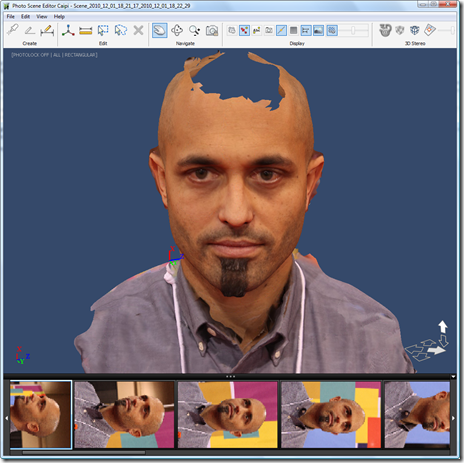
I was hoping to post during the week from Las Vegas, but it didn't end up happening. My time just bled away between the various classes I recorded/ presented/co-paneled and the time spent catching up with old friends and making new ones – mainly from among the various people who took the chance to provide greatly appreciated feedback regarding this blog. All in all it was a great week – as it always is – but it wasn't all smooth sailing: my AU Virtual session on our Plugins of the Month – which I'd struggled to get into Vegas to…
-
Or perhaps the title should really be "why it's really a good idea to avoid misusing mutable state when using F# Asynchronous Workflows". Ultimately I wanted to share a brief (or not, we'll see), cautionary tale about the dangers of shared state when implementing concurrent tasks. I've been using F# for some time, and have it fairly well drilled into my skull by this point that shared, mutable state is bad. And yet occasionally it somehow creeps in as an expedient way to solve certain issues: perhaps it's just a lack of discipline on my part or the years of…
-
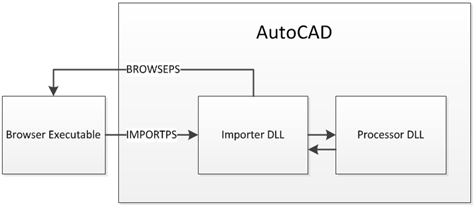
This handout is for the companion class to the one whose handout formed my last post. While that class was user-focused, this one, "CP322-2 - Integrate F# into Your C# or VB.NET Application for an 8x Performance Boost", is more developer-focused and takes the hood off the implementation of the BrowsePhotosynth application. The code for this special version of the application – which imports synchronously via C# and synchronously/asynchronously via F# – is available here for download. Introduction This class takes a look at the implementation of BrowsePhotosynth for AutoCAD, the ADN Plugin of the Month from October 2010 and…
-
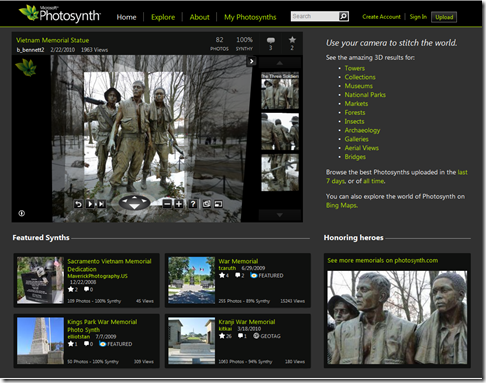
I've been a little slow getting my AU material together, this year (I've been called onto more pressing issues fairly consistently over the last weeks/months), so I'm very much up against Monday's content submission deadline. I'll certainly have the handouts ready, but the presentations will have to come later. As I've done in the past, I like to post my handouts here for people to take a look at (and provide feedback on in time for me to correct prior to the event ;-). Today's post is the handout for my AutoCAD user-focused class, "AC427-4 - Point Clouds on a…