AutoCAD
-
Actually, I wish that were true. I'm planning on taking some time off in October, but that seems a long way off, at this stage. What I've actually been doing is working with some REST-based APIs: firstly, I've been finishing up work on September's Plugin of the Month, TransTips for AutoCAD, Revit, Inventor, & 3ds Max (to be posted on Autodesk Labs in the next few days). TransTips makes use of the REST API for Bing Translator, to automatically translate tooltips in various products. Secondly, perhaps more excitingly, I've been coding against a possible future web service API for Project Photofly.…
-
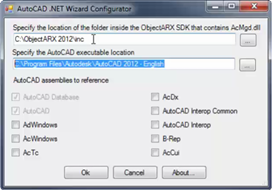
Visual C# Express and Visual Basic Express can be used successfully to build .NET applications for AutoCAD: in fact many developers use these tools to do so. One long-standing issue with using these tools with AutoCAD relates to debugging: the ability to debug using an external application is not directly exposed via the user interface Visual C#/Basic Express, which – as AutoCAD implements a plug-in hosting framework for .NET Class Libraries (or DLLs) – makes life complicated. The workaround for addressing this issue has been documented in this previous post and also on the ADN web-site, but thankfully this manual…
-
The class catalog for Autodesk University 2011 is now available to preview in advance of the conference registration opening up on August 30th. Here are the sessions I'm either presenting or hosting: CP3840 Integrating Microsoft® Kinect™ with AutoCAD® Lecture Nov 30, 3:15pm CP4459-U AutoCAD® .NET Development: Tools and Best Practices Unconf-erence Dec 1, 1:15pm I'm also honoured to be co-presenting the following session with the famous (and famously lowercase) dave espinosa-aguilar: CP4717 Unlimited AutoCAD® Scripting for Everyone Lecture Nov 29, 5:00pm And I'm part of the panel for the following sessions: CP2149 AutoCAD® APIs: Meet the Experts Stephen Preston Panel…
-

In the last post, we looked at how to stop entities from being highlighted during selection. This post looks at how to stop entities from being selected at all. Thanks again to Balaji Ramamoorthy for providing the underlying technique shown in today's code. The basic scenario we're using is similar to the last post – we maintain a list of DXF names for the classes we want to stop from being selected – but it could easily be adapted to using different criteria for removing objects from the selection: an example being the use of a similar (although admittedly not…
-

Thanks to Balaji Ramamoorthy, from DevTech India, for the basis of this post (some code he provided in a recent reply to an ADN member). The original question came from someone who wanted to stop text objects from being highlighted when selected. I've extended the mechanism to make it a little more flexible: it now maintains a list of object types (their DXF names) of objects that should not be highlighted, when selected. Balaji implemented a HighlightOverrule to control the highlighting. This doesn't stop the objects from actually being selected, however: in the next post I'll add some additional code…
-
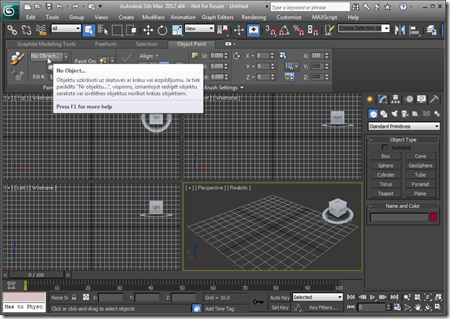
After adding Revit and then Inventor support to the original AutoCAD application, it made sense to go ahead and include support for 3ds Max. Here's a solution supporting these four products (and their verticals). And I can now confirm that a version of this application will be September's Plugin of the Month on Autodesk Labs. You may have noticed a lot of UI consistency introduced across these Autodesk products, in recent years, mainly due to a coordinated push from our product teams for a more consistent user experience. An internal acronym was used for the project driving consistency across these…
-
I'm now back from a nice, long weekend celebrating the Swiss National Day (August 1st) and our 10th wedding anniversary (which isn't until November, but who wants to hold a party then? ;-). So, getting back into the saddle, here's a question that came in recently by email: I'm using P/Invoke to call a function which is different on x86 and x64. How to code such entry point addresses dynamically, so one does not have to compile two separate versions, one for x86, and one for x64? While the answer can be found a previous post, it seemed worth calling…
-
As you're probably mostly aware, many of our 2012 products use .NET 4 as standard. This has proven "interesting" (i.e. challenging) when it comes to loading – for example – plugin DLLs downloaded from the web, due to .NET's updated security model. Our ADN Plugins of the Month on Autodesk Labs are a prime example: most were posted prior to AutoCAD 2012 shipping, but when downloaded locally and NETLOADed into AutoCAD 2012, very often a security error gets reported: Cannot load assembly. Error details: System.IO.FileLoadException: Could not load file or assembly 'file:///C:\Program Files\Autodesk\AutoCAD 2012 – English\ADNPlugin-QRCodes.dll' or one of its…
-
Once again, it turned out to be pretty straightforward to add Inventor support to our TransTips application. We now have a single solution which builds plugins for AutoCAD, Inventor and Revit. The plugins share a common translation and caching engine as well as a WPF graphical user interface for selecting languages. Here's a demonstration of the various plugins in action: I've fixed the right-to-left issue highlighted in the video, incidentally. The next steps are to implement an in-product editing capability and then perhaps to support 3ds Max. One great aspect of this project is that I'm getting to learn a…
-
A quick update, today. Last week Jeremy posted a migrated version of the TransTips plug-in for AutoCAD, this time working inside Revit. Thanks to the shared use of AdWindows.dll in both products, this was actually really easy. After this initial version, it made sense to refactor the code to have a core, shared file (not necessarily a separate DLL component – sharing source can give many benefits for smaller projects, such as this) used to build plugin DLLs for both AutoCAD and Revit. Here's the result: a single solution which will build TransTips DLLs for AutoCAD and Revit (including built…