AutoCAD
-
I received this question by email over the weekend: How does the Editor-Method GetSelection works with Keywords. I can't get it to work and there are no information found in the internet (nothing in your blog, nothing in forums). Here's some C# code that does just this: using Autodesk.AutoCAD.ApplicationServices; using Autodesk.AutoCAD.EditorInput; using Autodesk.AutoCAD.Runtime; namespace MyApplication { public class Commands { [CommandMethod("SELKW")] public void GetSelectionWithKeywords() { Document doc = Application.DocumentManager.MdiActiveDocument; Editor ed = doc.Editor; // Create our options object PromptSelectionOptions pso = new PromptSelectionOptions(); //…
-
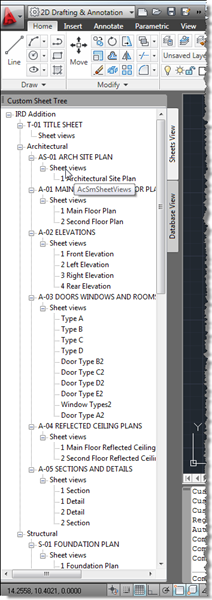
I didn't realise when I created the last post (with code borrowed from Fenton) that this would become a multi-part series – otherwise I'd clearly have called the earlier post "Part 1". 🙂 A comment from Harold Comerro requested information on getting more from the DST than was previously shown. Today's post extends the previous code to create two different slices of the data: a "Sheets View" and a "Database View", both hosted in the same palette set. Here's the updated C# code: using Autodesk.AutoCAD.ApplicationServices; using Autodesk.AutoCAD.EditorInput; using Autodesk.AutoCAD.Runtime; using Autodesk.AutoCAD.Windows; using acApp = Autodesk.AutoCAD.ApplicationServices; using ACSMCOMPONENTS18Lib; using System.Windows.Forms;…
-

In this previous post I mentioned a couple of additional translations of the VBA migration DevTV that were in progress. Here is an updated list of the various ones we now have available, including links to German, Spanish and Japanese versions: English view download (44.7 MB) Chinese view download (88.9 MB) French view download (39 MB) Portuguese view download (80.3 MB) Russian view download (39.3 MB) German view download (42.4 MB) Spanish view download (52.9 MB) Japanese MP4 download (66.9 MB) WMV download (78.5 MB) A big thanks to Augusto Gonçalves, Jeremy Tammik, Shigekazu Saito and Katsuaki Takamizawa for…
-
This year's API wishlist surveys for the following products are now ready: AutoCAD® AutoCAD® Civil 3D® AutoCAD® Map 3D® Revit® Autodesk Inventor® Autodesk Navisworks® My team runs these surveys year on year, and year on year Autodesk's various Engineering teams deliver upon them (and not just AutoCAD's). It really is worth providing us with your input: it's one of the most direct ways to influence the direction of the Autodesk products you customize or for which you develop applications. Tell us which APIs are most important to you: your feedback will not fall on deaf ears. And if you (optionally)…
-
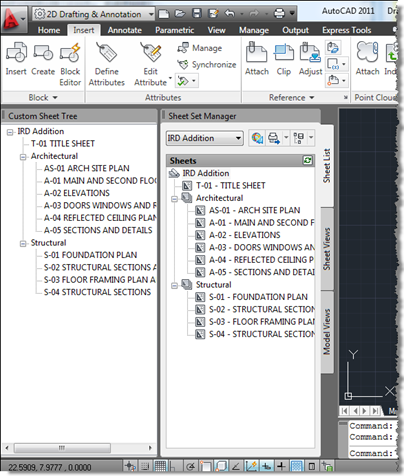
A big thank you to Fenton Webb, from DevTech Americas, for providing the code which was the basis for this post. Thanks, Fents! 🙂 Fenton sent a version of this code recently to an ADN member who was interested in duplicating the information shown in AutoCAD's Sheet Set Manager inside a custom, palette-hosted tree-view dialog. Fenton's version made use of WPF: I've dumbed it down a little to use WinForms, but may do a follow-up post using WPF (although the WPF TreeView doesn't appear to support data-binding, so I may well decide not to bother). I have made some other…
-

We recently made an offer available to members of the Autodesk Developer Network, to get a 10% discount on the purchase price of .NET Reflector Pro, a tool I've talked about a few times before. Having discussed this with Red Gate Software, the providers of .NET Reflector Pro, I'm now extending this offer to readers of this blog. For a limited time only – until the end of May 2010 – you can also purchase .NET Reflector Pro at a 10% discount. I've found this tool to be very useful, especially when working with AutoCAD's .NET API. For more information…
-
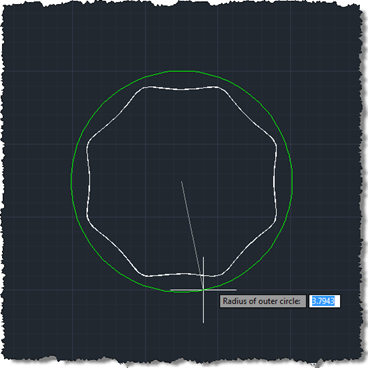
This one is a bit of an experiment: our first "fun" Plugin of the Month (fun in that it doesn't serve a serious work-related purpose that I can think of :-). I've post earlier versions of the code to this blog, but thought I'd post and share the latest & greatest. Scott has kindly announced the plugin's availability already over on It's Alive in the Lab. This is our first Plugin on the Month written in F#, which means an additional DLL needs to be copied with the plugin itself. Other than that the application should work just as if…
-
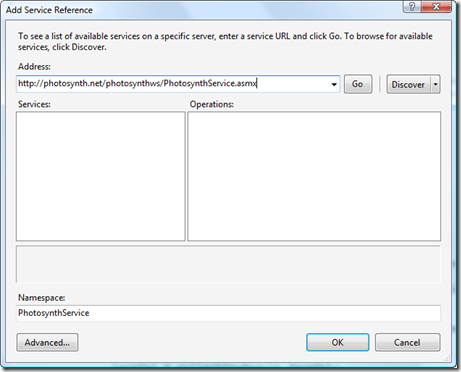
In the previous posts in this series we introduced a command that downloaded and imported point clouds from Photosynth.net, we introduced a WinForms user interface on top of it and then replaced that UI with one implemented using WPF. As threatened last time, we're now going to make some efficiency improvements in the original command implementation. In our previous implementation we were blindly asking for files, one after the other, and using failure to indicate when we'd reached the end. Which was fine, but it limited us in a few ways: we could not reliably parallelize this otherwise highly parallelizable…
-
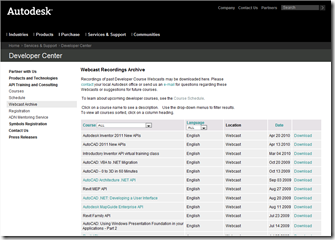
The recording of the previously announced "AutoCAD 2011 New APIs" webcast held on April 13th, 2010 is now available for download (19.8MB). We've also completed a much-needed restructuring of our online session information. Links to downloads of previously recorded sessions were available via our API training schedule (also available from http://autodesk.com/apitraining –> Schedule). They have now been granted their own, well-deserved page: [You'll notice the recording of the Inventor 2011 New APIs is also live – the Revit 2011 version will be posted soon, as will the one for AutoCAD Civil 3D 2011 (once the session has been held, of…
-
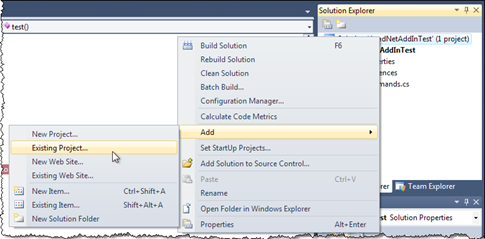
This question has popped up a few times since Visual Studio 2010's recent launch. I received it by email overnight from Roland Cox, which is interesting as I'd already planned this post for today. Do you know how to debug AutoCAD and a custom add in using Visual Studio 2010? What settings do I need to make? I know the add is getting loaded (the code runs in AutoCAD) but I can't set a breakpoint (it shows a empty circle saying that VS doesn't have the assembly loaded). I first saw this issue raised a few times on threads with…