User interface
-
This post is based on some information provided by Peter Muigg, a developer in Germany Austria who has long been a friend of Autodesk. In fact, if memory serves me well – and do step in if I'm mis-remembering, Peter – back in 1995 when I first joined the company, Peter delivered German-language ObjectARX training on behalf of Autodesk. Peter reached out with this tip just before the holiday break: he needed to display a dialog on AutoCAD startup, but found that it was too soon to do so on IExtentionApplication.Initialize() (it's assumed this module is either demand- or auto-loaded,…
-
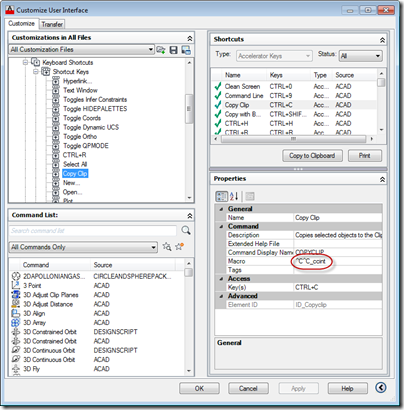
This was a fun question that came in from James Meading. I genuinely didn't think I'd manage to look into it before the break, but it tweaked my interest during my trip back from the UK: I thought this might be a topic you would be interested in. I do not use ctrl-v for pasting entities, only text to command line. I already tried removing the keyboard shortcuts to ctrl-v via the cui, and that just makes ctrl-v not do anything when command line does not have focus. So I think I need to write a transparent function, make a…
-

This is a really interesting topic. At least I think it is – hopefully at least some of you will agree. 🙂 The requirement was to create selectable – or at least manipulatable – transient graphics inside AutoCAD's drawing canvas. As many of you are probably aware, transient graphics are not hooked into AutoCAD's selection mechanism. This is mostly fine, but if you want to implement a ViewCube-like gizmo that manipulates the view or drawing settings in some way, it's hard to do so without the ability to react to the current cursor position is and what's happening with the…
-
After the first three parts of this series covered the basic jig that makes use of the standard keywords mechanism to adjust text's style and rotation as it's being placed, it eventually made sense to implement the remaining requirement initially provided for the jig: this post looks at different approaches for having the jig respond to single keystrokes rather than full keyword inputs. Dave Osborne very helpfully got me started on this by providing an initial implementation that makes use of an IMessageFilter – something he'd apparently gleaned from this previous post. Thanks, Dave! 🙂 All the approaches I'll outline…
-

Back in March, I received an email from Thomas Fitou suggesting an interesting blog topic: I was thinking about a cool feature in jigs: You invoke a command to enter an Mtext or text The editor is asking for some text You enter the text Then a jig is dragged asking for position But in the editor appear some options:[R]egular [B]old [I]talic [R]otate 90 If the user hits "B" the text becomes bold If the user hits "R" the text is rotated 90 degrees If the user hits "R" again, another 90 degrees and so on... It struck me as…
-
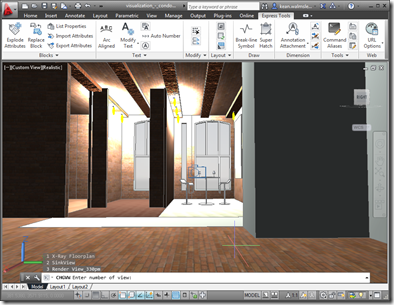
After looking at how the Bindable Object Layer (BOL) in AutoCAD might be used to get information about the current drawing, in today's post we're going to see how it can also be used to manipulate that data (in a fairly limited, albeit useful, way). But first, let's talk a bit about the origins of the BOL. It was first introduced as an architectural feature of AutoCAD when we were looking at delivering AutoCAD for Mac. It's common, these days, for programming frameworks to provide some kind of data-binding facility to simplify the creation of UIs: both WPF and Cocoa…
-
Some time ago, I posted code that used the Autodesk.AutoCAD.Windows.Data namespace to list the hatch patterns in the current drawing. Fenton Webb posted a follow-up on the AutoCAD DevBlog that took this further, extracting additional data from AutoCAD and using it to populate an Excel spreadsheet. Within that post, Fenton showed the technique required to access and iterate across other data collections – something I hadn't managed to do when creating my original post. Rather than repeat exactly what Fenton has put together – which is really nice, do take a look at it – I'm just taking a small…
-
I visited another Windows 8-related conference in Zürich, yesterday. Despite much of the content being repeated from the last one I attended, I actually found it really useful: having spent time working with Windows 8 and WinRT over the last few weeks, I found I got more out of the demos and could also ask more intelligent questions of the Microsoft personnel in attendance (thanks for all your help, Ronnie :-). And there was some new content I hadn't seen, previously: I managed to sit in briefly on an Azure session (which was admittedly a bit too IT-centric for my…
-
This post was inspired by an email I saw from Philippe Leefsma, from DevTech EMEA, which made use of the Autodesk.AutoCAD.Windows.Data namespace – something I didn't even know existed. The specific example Philippe showed was how to access the list of hatch patterns available in the current drawing without iterating through the relevant dictionary in the named objects dictionary. Here's Philippe's C# code: using Autodesk.AutoCAD.ApplicationServices; using Autodesk.AutoCAD.EditorInput; using Autodesk.AutoCAD.Runtime; using Autodesk.AutoCAD.Windows.Data; public class DataStuff { [CommandMethod("HPS")] static public void GetHatchPatterns() { Editor ed = Application.DocumentManager.MdiActiveDocument.Editor; foreach ( string str in HatchPatterns.Instance.AllPatterns) …
-

Thanks to Matt Stein, Senior User Experience Manager in the AutoCAD team, for giving me permission to publish the following information. In this previous post, we can see how it's possible to display our own contextual ribbon tabs inside AutoCAD during custom operations. To help make applications consistent with AutoCAD, here are some guidelines around colours to be used contextual ribbon tabs (the "Theme" attribute you should set in your custom ribbon tab's XAML file): If it is an annotation object: Purple Anything to do with blocks: Yellow Anything to do with underlays or references (except blocks): Cyan Text editor…