User interface
-
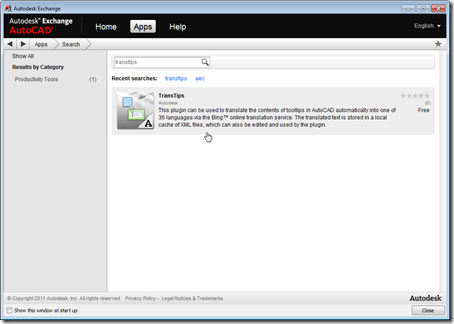
Just a quick update to let you know that – as a result of the steps we took to prepare and submit the application for consideration – TransTips is now live on the Apps tab of Autodesk Exchange, which means it can now be loaded more easily into AutoCAD 2012: This application was first posted on this blog, and has since become a Plugin of the Month on Autodesk Labs. If you'd like to see it in action (and in products other than AutoCAD), please see this YouTube video.
-
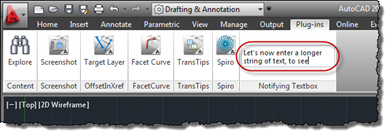
In the last post, we saw a great little sample for adding a textbox to AutoCAD's ribbon which notifies your application of the "commands" entered into it (however you choose to interpret them in your code). In this post, we'll take that further and have that textbox expand vertically as text gets entered, wrapping the contents across multiple lines (only breaking the text at the ends of words, too). Here's the updated C# code, with modified lines in red. You can get the original file here. 1 using Autodesk.AutoCAD.ApplicationServices; 2 using Autodesk.AutoCAD.EditorInput; 3 using Autodesk.AutoCAD.Runtime; 4 using Autodesk.Windows; 5 using System.Windows.Media; 6 using System.Windows.Controls; 7 using System.Windows.Input;…
-
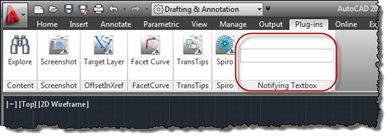
This is a really cool little sample put together by Philippe Leefsma, from our DevTech team in Europe, with the help of George Varghese from the AutoCAD Engineering team. Thanks, Philippe and George! 🙂 This question came up, recently: an ADN member wanted to be able to add an editable textbox to the ribbon inside AutoCAD and then be notified of the data entered into it, as well as being notified when the control gained and lost focus. Here's some simple C# code that does just this: using Autodesk.AutoCAD.ApplicationServices; using Autodesk.AutoCAD.EditorInput; using Autodesk.AutoCAD.Runtime; using Autodesk.Windows; using System.Windows.Controls; using System.Windows.Input; using…
-
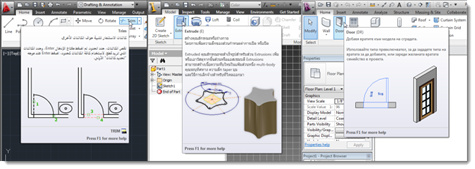
Regular readers of this blog may have followed the development of this plugin, but I've written this post is to announce its availability more officially (in addition to Scott's post from last week). TransTips uses the Bing Translator web service to translate tooltips into one of 36 languages on-the-fly, as they are displayed by AutoCAD, Inventor, Revit, 3ds Max and the products based upon them. The 36 languages are those currently supported by the Bing Translator service: Arabic, Bulgarian, Catalan, Chinese, Czech, Danish, Dutch, Estonian, Finnish, French, German, Greek, Haitian Creole, Hebrew, Hindi, Hungarian, Indonesian, Italian, Japanese, Korean, Latvian, Lithuanian, Norwegian,…
-
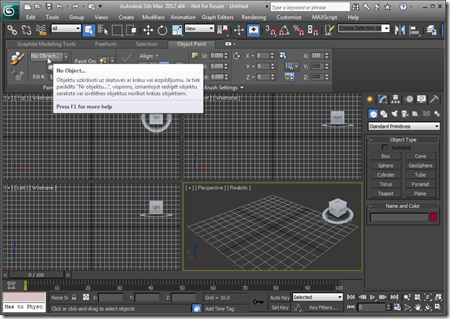
After adding Revit and then Inventor support to the original AutoCAD application, it made sense to go ahead and include support for 3ds Max. Here's a solution supporting these four products (and their verticals). And I can now confirm that a version of this application will be September's Plugin of the Month on Autodesk Labs. You may have noticed a lot of UI consistency introduced across these Autodesk products, in recent years, mainly due to a coordinated push from our product teams for a more consistent user experience. An internal acronym was used for the project driving consistency across these…
-
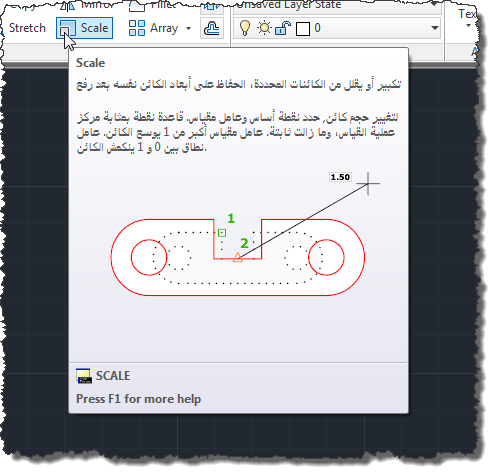
In this previous post we introduced a technique for automatically translating AutoCAD's tooltips into one of 35 different languages via an online translation service. To improve the process at various levels – rendering it more efficient and enabling the possibility of local editing and crowdsourced localization – this post introduces caching of the translation results to a set of local XML files. A few comments on the implementation changes: There's now a TRANSTIPSSRC command, which allows you to set the source language (using a similar UI to the target language). This is useful if you're working on non-English AutoCAD (our…
-
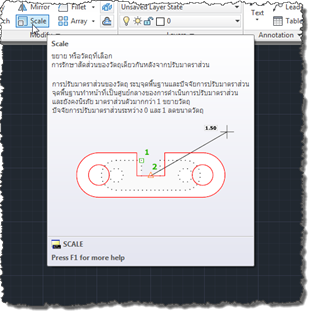
One of the great benefits I have from working in our Neuchâtel office is my proximity to a great many talented members of Autodesk's Worldwide Localization team, who are responsible for translating most of our products into various languages. Over the last few months, I've been working even more closely than usual with that team, mainly looking at ways Autodesk might broaden the ability to localize our software. A couple of hot topics are of particular interest, these days, in the world of localization: machine translation and crowdsourcing. The implementation I'll be showing over the next few posts actually hits…
-

To continue on the theme established in the last post, today we're going to go ahead and modify AutoCAD tooltips, prefixing them with a fixed string. This is the next step on the path to modifying them in a more meaningful way (to translate them into a different language, for instance). Here's some C# code that implements a command to prefix all AutoCAD tooltips with a silly string ("Kean says this command …"): using Autodesk.AutoCAD.ApplicationServices; using Autodesk.AutoCAD.EditorInput; using Autodesk.AutoCAD.Runtime; using System.Collections.Generic; using System.Windows.Controls; using System.Windows; namespace PrefixTooltips { public class Commands { List<string> _handled = null;…
-
I'm working on an internal project that seems to be worth sharing externally. I'm looking at the potential for run-time modification (thinking mainly about translation) of tooltips displayed by AutoCAD. The first step towards realising this is clearly to determine when tooltips are going to be displayed and to establish the content of these tooltips. Here's some C# code that does this (written with Visual Studio 2010, so users of prior versions may need to swap out my lambda function for a delegate or even a full event-handler function). You'll also need to include AdWindows.dll in addition to the typical…
-
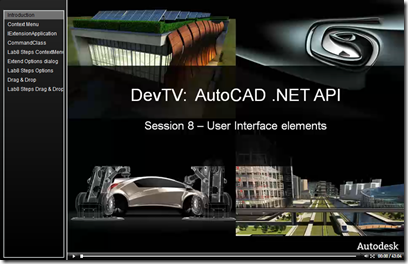
Another Friday, another installment of Wayne Brill's AutoCAD .NET training DevTV series (to complement those sessions from previous weeks). Today's session is focused user-interface elements such as the .NET attributes for exposing commands and optimizing loading, adding your own tab to the options dialog and implementing drag & drop. This series of DevTV sessions is a companion for the new AutoCAD .NET training material available from the AutoCAD .NET Developer Center. Enjoy! 🙂