User interface
-

This week I've spent quite a bit of time looking into future API features. For one of them I needed to create a progress meter, and thought to myself "why not create one in HTML5?" And as it's nothing specific to a future product release, I decided to go ahead and post it now. For context, here's the way AutoCAD's standard progress meter currently looks, displayed using the code from this previous post: So why would you go head and create your own progress meter? A few different reasons come to mind… yes, AutoCAD has its own, but perhaps you…
-
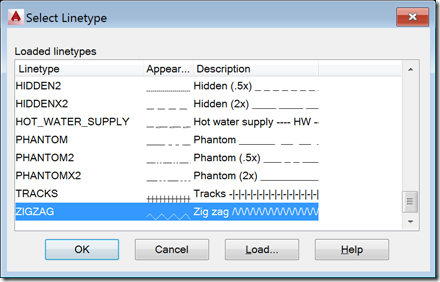
I received this request from Mateusz Andrzejczak, over the weekend: I have problem with LineTypeDialog. Your part of the code is working perfectly, but i have problem with modifying the values. I have a SelectionSet that holds all object that are selected with using a filter. I want to use LineTypeDialog to select linetype and then accept so all the object in selection set will change to selected linetype. I'm working with this for a few hours and it's not working. Any tip for me? The question related to this old post. I started by sending Mateusz a link to…
-
It seems like I've been living in JavaScript land (and no, I deliberately didn't say "hell" – it's actually been fun 🙂 for the last few weeks, between one thing or another. But I think I've finally put the finishing touches on the last of the JavaScript API samples I've prepared for AU 2014. This sample was inspired by Jim Awe – an old friend and colleague – who is working on something similar for another platform. So I can't take any credit for the way it works, just for the plumbing it took to make it work with AutoCAD.…
-
One of the pieces of feedback I received from internal folk on the prototype VR app I developed for Google Cardboard and then added voice recognition to was "it'd be really cool to add ViewCube-like navigation commands". Which basically meant adding "front", "back", "left", "right", "top" & "bottom" to the list of voice commands recognised by annyang and have them hooked up to a function that changes the view accordingly. The main complication being the fact that some models come in with "Z up" despite the majority having "Y up". Hopefully none will come in with "X up", an eventuality…
-

I nearly named this post "Creating a stereoscopic viewer for Google Cardboard using the Autodesk 360 viewer – Part 4", leading on from the series introduction and then parts 1, 2 & 3. But then I decided this topic deserved it's very own title. 🙂 The seed for this post was sown during the VR Hackathon, at the beginning of which I had an inspiring chat with Theo Armour. Not only does Theo have a name worthy of a gladiator – and it turns out there is a list of gladiator names on the Internet, just one more reason I…
-
The title of this one is a little specific – the post actually deals with the scenario of passing data from .NET to an HTML-defined palette, as well as some other tips & tricks – but it's something I wanted to show. Here's the basic idea: whenever a closed curve gets added to the drawing, we want to display its area as the only item in an HTML palette. We also want the palette to update when objects get erased, etc., which makes life somewhat trickier. To set the scene, here's a quick screencast of the finished application in action…
-

After introducing the series and looking at sample applications for 2D graphics using Paper.js and 2.5D graphics using Isomer, it's now really time to go 3D. We're going to use much of the same code we saw in the last post – with some simplification as we no longer need to sort the solids by distance – but this time we're going to feed data into an HTML client app that's fundamentally similar in nature to the one seen in this series of posts using Three.js. I'm happy to have some experience using Three.js, because it happens to be a…
-
Having introduced this series, it's time to look at some code. This first sample shows how to create and host a web-page that uses an external graphics library – in our case Paper.js – within an AutoCAD application. The main "trick" to this is going to be getting the data from the HTML page into AutoCAD, which we'll do by extending AutoCAD's shaping layer. Bear in mind that this code will work with AutoCAD 2015, but I can't guarantee it will do so with 2014 (the JavaScript API was very much a "preview" in that release). Something I should say,…
-
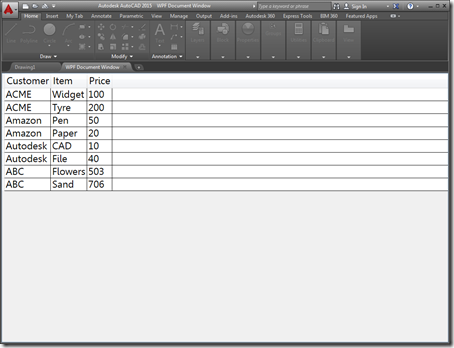
A few people expressed an interest in understanding how AutoCAD 2015's ability to open HTML pages inside its frame – shown in this recent post – could be extended to work with "native" user interfaces. This post shows how that can be done using WPF – the other supported mechanism for adding new documents to AutoCAD's main frame introduced in the 2015 release. Just as with last week's post, there really isn't that much to it: you just need to add your own WPF UserControl to the project and load that into an Autodesk.AutoCAD.Windows.WPFDocumentWindow object and pass it to other…
-
The "call for proposals" for AU2014 is going out on April 23rd and will remain open for about a month. This is approaching quickly, so get your thinking hats on if you're considering submitting a class proposal. From my side I'm thinking about a few possible topics: Implementing a tangible user interface for AutoCAD using SensorTag Integrating a web-based user interface into AutoCAD via its JavaScript API I'm also toying around with the idea of doing a kind of "meta" session, during which we'd look at some of my favourite blog posts/areas of research over the years. Something like "8…