AutoCAD .NET
-
On my flight across to Toronto, I took another look at the "What's New in AutoCAD 2015" section of the .NET API documentation and decided to dig into the new SystemVariableEnumerator implementation. I was particularly curious about this feature as there is already a way to get access to system variables via the Autodesk.AutoCAD.Runtime.SystemObjects.Variables collection. As an initial look at these two classes, I decided to put together a couple of simple variable iterator commands that use the same function to print out some information concerning the system variables exposed by each collection. Here's the C# code implementing two commands,…
-

After introducing the series and looking at sample applications for 2D graphics using Paper.js and 2.5D graphics using Isomer, it's now really time to go 3D. We're going to use much of the same code we saw in the last post – with some simplification as we no longer need to sort the solids by distance – but this time we're going to feed data into an HTML client app that's fundamentally similar in nature to the one seen in this series of posts using Three.js. I'm happy to have some experience using Three.js, because it happens to be a…
-
After introducing the series and looking at a sample 2D JavaScript application, it's time to go 3D. Well, 2.5D, anyway. We're going to implement a simple sample using the Isomer library that extracts bounding box information about 3D solids – which could be extended to get more detailed topological information, albeit with quite some work – and displays them in an isometric view in the HTML canvas. This time we're only going to have a single button in our UI allowing model updates to be refreshed in our isometric view. I decided to leave this as a manual operation, but…
-
Having introduced this series, it's time to look at some code. This first sample shows how to create and host a web-page that uses an external graphics library – in our case Paper.js – within an AutoCAD application. The main "trick" to this is going to be getting the data from the HTML page into AutoCAD, which we'll do by extending AutoCAD's shaping layer. Bear in mind that this code will work with AutoCAD 2015, but I can't guarantee it will do so with 2014 (the JavaScript API was very much a "preview" in that release). Something I should say,…
-

During the last week or so I've put together a number of new sample integrations of JavaScript-based technologies with AutoCAD, mainly to form the basis of my proposed AU2014 class but also (obviously) to share here. This first post introduces the series, giving an overview of some benefits – as I see them – of adopting this development environment. As I'm sure I've mentioned before, over the years I've had a love/hate relationship with HTML and JavaScript: I'm comfortable working with them but have lived through plenty of frustrating moments. These days, though, I'm finding it to be very different…
-
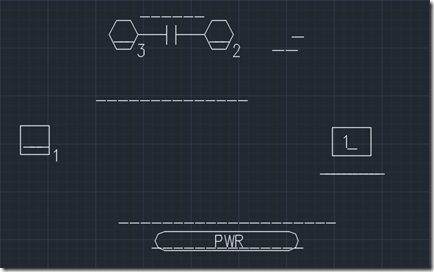
I had an interesting email last week from Josh Mathews: I'm having some trouble figuring out how to fix this problem I have and I'm not sure what the best way is to attack it. I have a large set of drawings that have these random strings of underscores strewn throughout the drawing (which look like random lines scattered all around when the drawing is printed – and make it confusing to look at), and so I'm trying to write a function that will iterate through the drawing and find all the text strings that contain ONLY underscores and then…
-
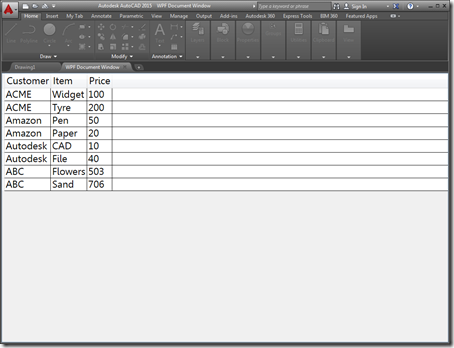
A few people expressed an interest in understanding how AutoCAD 2015's ability to open HTML pages inside its frame – shown in this recent post – could be extended to work with "native" user interfaces. This post shows how that can be done using WPF – the other supported mechanism for adding new documents to AutoCAD's main frame introduced in the 2015 release. Just as with last week's post, there really isn't that much to it: you just need to add your own WPF UserControl to the project and load that into an Autodesk.AutoCAD.Windows.WPFDocumentWindow object and pass it to other…
-

I have to say that I'm having an absolute blast getting to know the new API features in AutoCAD 2015. It turns out I'd barely scratched the surface with my original post about the impact for developers. It's a release that just keeps on giving. 🙂 One new feature that I've had a lot of fun playing with is the "cursor badge" capability, something you may have seen blogged about from a user's perspective. The good news is that the ability to add your own cursor badges is provided in the public API (although I did end up using an internal…
-

Many thanks to Holger Rasch who worked out how to fix the code in this previous post. It really doesn't matter that 3 years have passed, Holger – I have no doubt people will greatly appreciate the fact the code can now run without causing the annoying display issues it produced previously. Holger made a few adjustments to the implementation to make sure the persistent hatch loop gets added and removed in the right places. Here's the updated C# code: using Autodesk.AutoCAD.ApplicationServices; using Autodesk.AutoCAD.DatabaseServices; using Autodesk.AutoCAD.EditorInput; using Autodesk.AutoCAD.Geometry; using Autodesk.AutoCAD.Runtime; using Autodesk.AutoCAD.Colors; using System; namespace HatchJig { class…
-
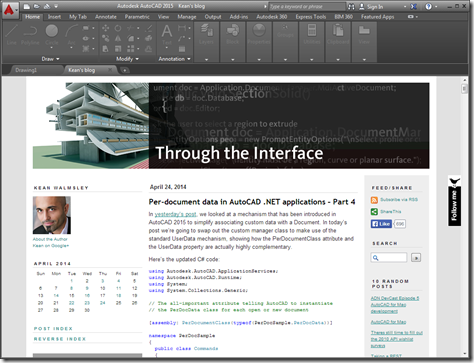
This was a fun one. It was really only a single line of code but I decided to embellish it a bit to make it a bit more useful. The "task" I set myself was to open a web-page – this blog, in fact – inside AutoCAD as an MDI child. AutoCAD can now host web-pages directly inside its MDI frame – the New Tab Page is a great example of that – and this mechanism can be used for external applications, too. You can also load non-HTML documents into the frame, but it's quick and easy to use HTML.…