AutoCAD
-

Being here in San Rafael, it seemed like a good opportunity to put pen to paper on the internals of the JavaScript API introduced in AutoCAD 2014. It's a topic I've been meaning to get to for some time, and sitting in the cube next to Albert Szilvasy helps me get information straight from the horse's mouth, as it were (no offence, Albert ;-). For those of you who don't know Albert, he's someone who has had an incredible impact on the AutoCAD product, over the years, particularly from a platform perspective. Albert was the person to architect and introduce…
-
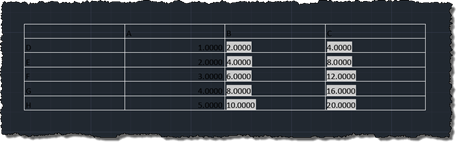
I'm back in San Rafael after a tiring – but very rewarding – two days down in Santa Cruz. I've decided to rattle out a quick post – inspired by this recent comment – before heading out for dinner, so I hope my brain isn't playing tricks on me when it says the code's good enough to post. Please do let me know if you see anything wrong with it. Here's the question: Kean, I am wondering how to do this on table objects. When importing a table from excel as pasting special ACAD objects, you can reset the table…
-

Or otherwise named "Creating an AutoCAD jig to dynamically display a guilloché pattern using F#". But then why pass up the chance for a Jerry Maguire reference? 🙂 Anyway, to continue on from last week's post, Doug – who had presented the original challenge – went on to suggest that I give it the same treatment as Spiro. Basically to implement a jig to display the guilloche pattern dynamically as you input the various options. I understand the difficulty in understanding the nature of the geometry being created in the previous version… the fact that I'd named the original variables…
-
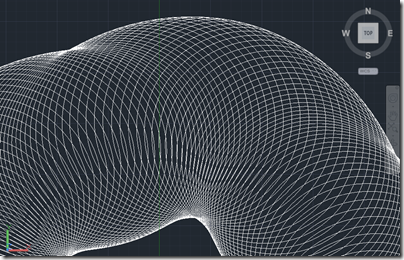
Here's a fun one to finish up the week. And no, it isn't a belated April Fool's gag. 😉 I should probably say right away that you won't be printing money after reading this blog post, but you might know more about some of the security measures used by those who do. A couple of weeks ago, I received an email from Doug Bell at PaperMoneyWorld.net: I have tried your Spiro for AutoCAD and I enjoy it very much. I would like to challenge you to another function I would like to see that is related to the spirograph. I'd…
-
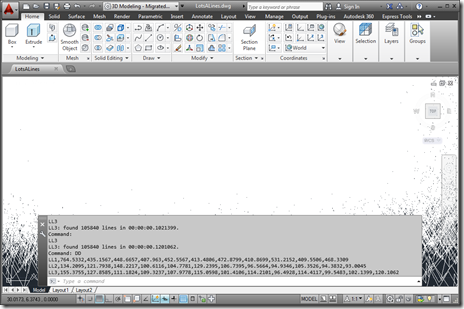
As a follow-on from the last post, in today's we're going to look at a crude approach for collecting execution information about functions of your choosing from a .NET app inside AutoCAD. We're going to extend the implementation shown last time to record the time taken for the various "instrumented" commands to execute and make it easy to copy and paste this "performance" data into a tool such as Excel. We could also dump out a file directly that can be imported into Excel, but this way is simpler and only slightly more manual. It's important to note the quotes…
-
Late last week I received an interesting email from Bruno Saboia, who's been experiencing some performance issues with code he'd written to return all the objects of a particular type – in his case, Lines – from the model-space of the active drawing. We exchanged a few emails on the topic, and Bruno kindly allowed me to post his code and my suggestions for changes. In today's post, we're going to look at both the code and my suggestions, while in the next post (in this mini-series, at least) we'll look at a simple execution framework that can allows you…
-
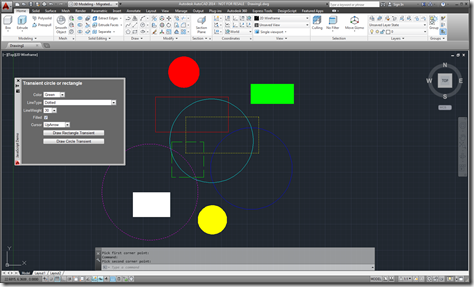
After introducing the new JavaScript API as one of the new features in AutoCAD 2014, in the last post we looked at a simple command defined using JavaScript. In this post, we're going to implement a simple, palette-based UI inside AutoCAD using HTML5 and JavaScript. Let's start by looking at the HTML code (with the JavaScript embedded, for simplicity): <html> <head> <title>Draw a transient circle or rectangle</title> <script type="text/javascript" src="http://www.autocadws.com/jsapi/v1/Autodesk.AutoCAD.js"> </script> <script type="text/javascript"> // Some global variables …
-
As promised in yesterday's post, here's my first attempt at writing a simple JavaScript app for AutoCAD. This app is purely JavaScript – no HTML to be seen, anywhere – and implements a command inside AutoCAD that will zoom to the extents of an entity selected by the user. Let's start by looking at the source code, which has been posted here. // Command to zoom to the extents of a selected entity function zoomEntity() { try { // Set the options for our user prompt var peo = new Acad.PromptEntityOptions(); peo.setMessageAndKeywords("\nSelect an…
-

Today is the official launch of 2014 family of products. AutoCAD 2014 will be available in the coming days to customers around the world. You'll no doubt find lots of information on the interwebs regarding the product's features, so I'm going to focus specifically on the opportunities – and requirements – the new release presents to developers. Firstly, ADN members should refer to the (as ever) thorough information produced by the DevTech team and posted under the "Events" section of the ADN website. I expect the AutoCAD DevBlog will be making much of this available to a broader audience over…
-
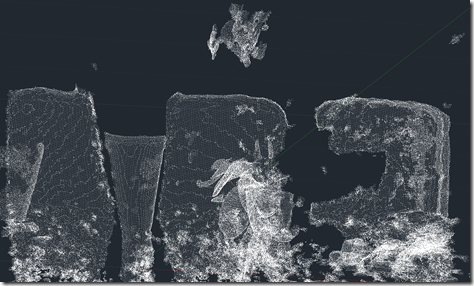
OK, here goes: my first (public) attempt at integrating the brand new Kinect Fusion functionality – made available this week in v1.7 of Microsoft's Kinect for Windows SDK – into AutoCAD. There are still a few quirks, so I dare say I'll be posting an update in due course. As mentioned in the last post, I've been working on this for some time but can now show it publicly, as the required SDK capabilities have now been published. As part of this effort, I've gone ahead and made sure the other Kinect samples I've written for AutoCAD work with this…