Selection
-

In a recent comment, Adam requested the code from this previous post be modified to work in the same way as another, more recent, post: Is it possible to get a version of this code where the user is prompted to create a selection set of nested objects first, and then being prompted for the new colour of the objects? i.e is it possible to get the code for changing colour working the same way as it does for changing layer, as detailed here? This would allow the user to pick and choose the objects affected, rather than making a…
-
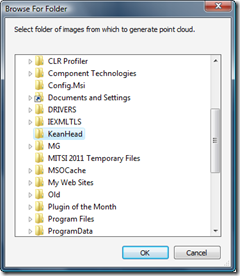
After I'd had such fun working out how to bring point clouds from Microsoft's Photosynth into AutoCAD, I was delighted when the Autodesk Labs team came to me with the suggestion of a comparable – although ultimately more useful – integration with the then-soon-to-be-released Project Photofly. The concept was simple: provide AutoCAD users with a command allowing them to select a folder of images to upload to – and be processed by – Photofly. The resulting photo scene – once available – would then be used to generate a point cloud back inside the AutoCAD session. So basically a one-click…
-
Here's some simple C# code that asks the user to select an external reference and then detaches it from the current drawing: using Autodesk.AutoCAD.Runtime; using Autodesk.AutoCAD.ApplicationServices; using Autodesk.AutoCAD.DatabaseServices; using Autodesk.AutoCAD.EditorInput; namespace XrefApplication { public class Commands { [CommandMethod("DX")] static public void DetachXref() { Document doc = Application.DocumentManager.MdiActiveDocument; Database db = doc.Database; Editor ed = doc.Editor; // Select an external reference Transaction tr = db.TransactionManager.StartTransaction(); using (tr) { BlockTableRecord btr = null; ObjectId xrefId = ObjectId.Null; // We'll loop, as…
-
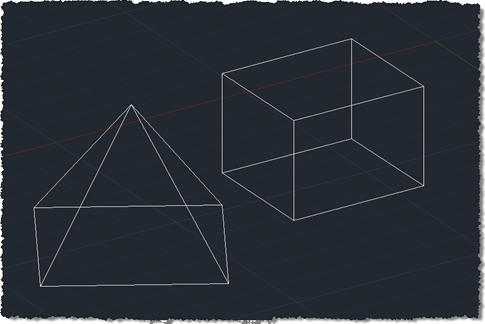
I finally came up with a succinct title for this post after struggling with "Shading a face of an AutoCAD solid with a transparent hatch pumped through the transient graphics sub-system using .NET". Or words to that effect. 🙂 So yes, this post shows how to create a temporary hatch with transparent shading that then gets drawn as transient graphics at the right place in the model: in this case, the face selected using the approach shown in this previous post (which later evolved into a "look at" type feature). The post was inspired by an email I received a…
-
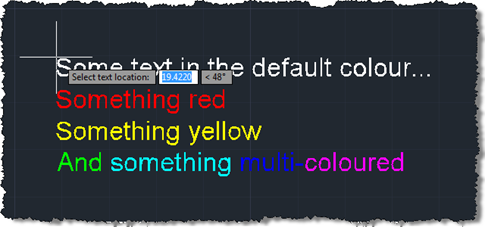
In the last post we created a simple MText object containing sections of text with different colours. The object was located at a hard-coded location, so now we want to use a simple technique to allow placement of our MText (or any object, for that matter) in the current user coordinate system. Rather than implementing a full jig class – whether a DrawJig or an EntityJig (the latter being most appropriate for this scenario) – we're going to use the .NET equivalent of the old (draggen) or acedDragGen() functionality: the overload of Editor.Drag() which takes a selection set, prompt and…
-

After seeing Shaan list the results of the latest AUGI wishlist, I started thinking about which of the items would be worth covering either on this blog or via a Plugin of the Month. The second item on the list, "Automatically Differentiate Manually Edited Dimensions", has (hopefully) been addressed by Dimension Patrol, this month's Plugin of the Month, so that's a good start, anyway. The first item, "Change Objects in a Block to a new Layer", seemed as good a good place to start as anywhere. Here's some C# code that builds upon a technique for selecting/highlighting nested entities shown…
-
I received this question by email over the weekend: How does the Editor-Method GetSelection works with Keywords. I can't get it to work and there are no information found in the internet (nothing in your blog, nothing in forums). Here's some C# code that does just this: using Autodesk.AutoCAD.ApplicationServices; using Autodesk.AutoCAD.EditorInput; using Autodesk.AutoCAD.Runtime; namespace MyApplication { public class Commands { [CommandMethod("SELKW")] public void GetSelectionWithKeywords() { Document doc = Application.DocumentManager.MdiActiveDocument; Editor ed = doc.Editor; // Create our options object PromptSelectionOptions pso = new PromptSelectionOptions(); //…
-
We've had a few reports of issues with the Screenshot "Plugin of the Month". They fall into two main categories: Attempting to NETLOAD the application DLL from a network share Within the ReadMe for each of the plugins we've documented that each application's DLL module should be copied to the local file system – preferably inside the AutoCAD Program Files folder – before being loaded by NETLOAD. We recommend this because it essentially stops users from hitting a whole category of .NET Framework-related problems when loading and running the plugins. If you didn't heed this advice then you'd probably find…
-
Given the previous posts on this topic, I'd hope it's no great surprise to regular readers that this month's "Plugin of the Month" consists of a tool to simplify the capturing of screenshots within AutoCAD. This month's tool allows you to capture the current document, the entire application and an area of the drawing specified by the user or the extents of a set of objects, sending the results to a file or to the clipboard. It has optional settings to remap the background colour (which is useful for people working with a non-white background colour but who want to capture…
-
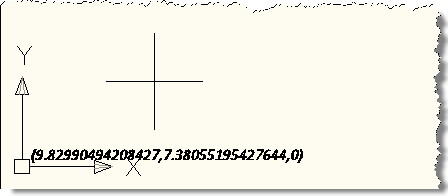
Another interesting little problem, that of how to detect the use of modifier keys during a jig operation (to indicate different jig behaviour). In this case the specific task was to detect the use of the Control and Shift keys, which – if held down during the jig – should cause our object to display differently. I started with the code from this previous post which uses a DrawJig to place text in the plane of the screen during the jig operation. I initially thought I'd have to use a message filter (as shown in this previous post), but I…