Graphics system
-
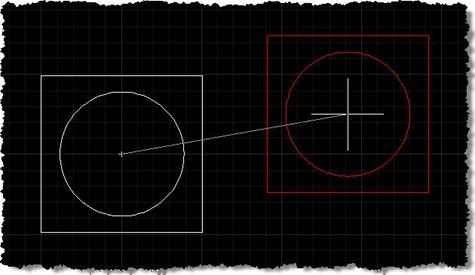
A big thanks to Norman Yuan for the technique shown in this post. I stumbled across Norman's post on this topic, and decided to take his code and rework it for posting here, with Norman's permission, of course. Very interesting stuff! 🙂 First things first: you probably don't have a burning need to reinvent either the wheel or AutoCAD's MOVE command. That said, this is a technique that may be of interest to many of you, especially if – for whatever reason – you're looking for an alternative to using a jig. The technique Norman has shown uses a combination…
-

Yesterday Scott Sheppard announced the availability of this plugin over on It's Alive in the Lab. We originally received a request for this Plugin of the Month some time ago. Fenton Webb, from our DevTech Americas team, developed the initial version using an ObjectARX custom entity – as the requester required support for versions of AutoCAD prior to 2010 – but for this public release, Stephen Preston went ahead and re-implemented the mechanism in a .NET application using the Overrules API introduced in AutoCAD 2010. This plugin basically allows you to see graphically when an AutoCAD drawing is digitally signed,…
-
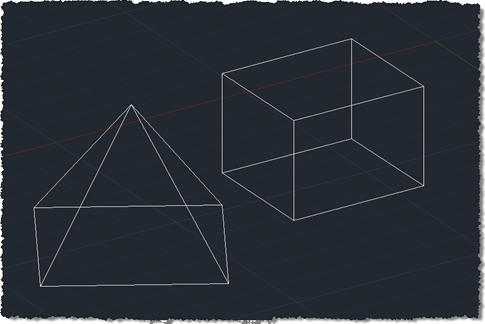
I finally came up with a succinct title for this post after struggling with "Shading a face of an AutoCAD solid with a transparent hatch pumped through the transient graphics sub-system using .NET". Or words to that effect. 🙂 So yes, this post shows how to create a temporary hatch with transparent shading that then gets drawn as transient graphics at the right place in the model: in this case, the face selected using the approach shown in this previous post (which later evolved into a "look at" type feature). The post was inspired by an email I received a…
-
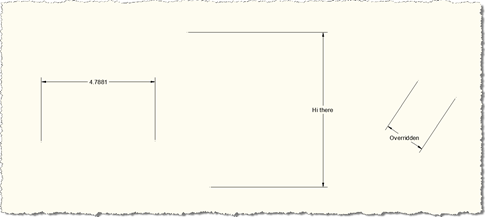
Thanks to Stephen Preston for providing the prototype that I extended for this post. He put it together in response to a suggestion for a new Plugin of the Month from Shaan Hurley, who thought a "dimension finder" tool for locating overridden dimension text would be useful for people. This code may well develop into that tool, but for now it's being posted in its current, admittedly still somewhat rough, state. The below code implements a couple of overrules using the mechanism introduced in AutoCAD 2010: one to highlight dimensions in a drawing which have had their text manually overridden…
-
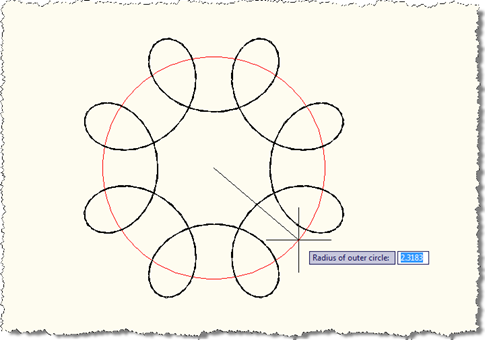
Last week we looked at a preliminary version of this application that made use of an EntityJig to display a Spirograph as we provided the values needed to define it. While that was a good start, I decided it would be better to show additional graphics during the jig process, to give a clearer idea of the meaning of the information being requested from the user. I wanted, for instance, to show temporary circles indicating the radii of the outer and inner circles, mainly to make it clearer how the various parameters affect the display of the resultant Spirograph pattern.…
-
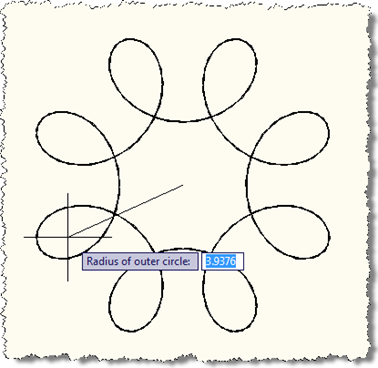
After my initial fooling around with turning AutoCAD into a Spirograph using F#, I decided to come back to this and bolt a jig on the front to make the act of making these objects more visual and discoverable. The process was quite interesting – I'd created jigs from Python and Ruby, but not from F#, so this was a first for me. It's also a multi-stage jig, which is fun: we acquire the outer radius of the pattern followed by the radius of the smaller circle and the distance of the pen from the smaller circle's center. At each…
-
We've had a few reports of issues with the Screenshot "Plugin of the Month". They fall into two main categories: Attempting to NETLOAD the application DLL from a network share Within the ReadMe for each of the plugins we've documented that each application's DLL module should be copied to the local file system – preferably inside the AutoCAD Program Files folder – before being loaded by NETLOAD. We recommend this because it essentially stops users from hitting a whole category of .NET Framework-related problems when loading and running the plugins. If you didn't heed this advice then you'd probably find…
-
Given the previous posts on this topic, I'd hope it's no great surprise to regular readers that this month's "Plugin of the Month" consists of a tool to simplify the capturing of screenshots within AutoCAD. This month's tool allows you to capture the current document, the entire application and an area of the drawing specified by the user or the extents of a set of objects, sending the results to a file or to the clipboard. It has optional settings to remap the background colour (which is useful for people working with a non-white background colour but who want to capture…
-
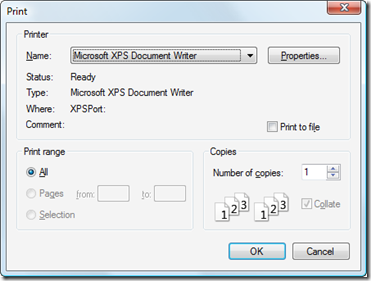
Now that I'm completely finished with my AU 2009 preparation, it's time for me to get back to the next "Plugin of the Month", given that we have just a few days left of the month of October. Here's another iteration of the application, this time implementing the following enhancements: The application now keeps the chosen settings: they follow you between drawings and even between sessions. We now perform a Regen after selecting objects to capture to unhighlight them There is now a "Print" setting, which gives the option of sending the capture image directly to a printer The image…
-
Thanks to all those who provided feedback on this recent post. I really appreciate people taking the time to provide feedback – both positive and negative – as I want to ensure this tool is used by more than just a few AutoCAD users. Today's version extends the last one to include a few more "Settings": Existing settings Output Allows the user to choose whether the captured image is copied to the clipboard or saved to a raster file Background Allows the user to force the background colour to white Hopefully useful for people using a non-quite background but want…